Similar to HTTP Protocol, DNS protocol also make use of common message format for all query and response exchanges. This could be between client-server or between servers.
Message format:
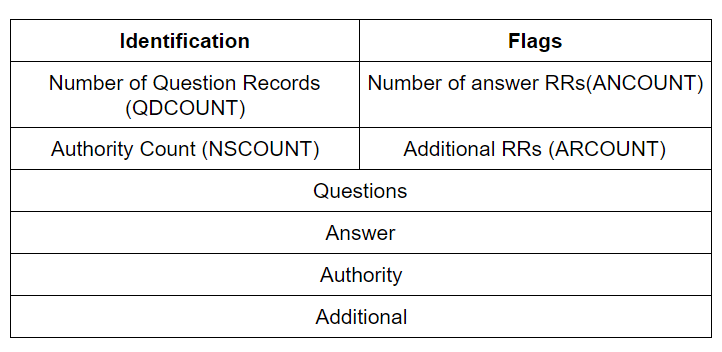
Identification:
It is a 16-bit (2 bytes) field that is generated by the client to match the response from the server. It is copied by the server into the response so that the client’s device will be able to match the response with the query. This identification number is always a different one for each query sent.
Flags:
This is a 16-bit field that is further sub-divided as follows:

Q/R: It is used to differentiate between a query and a response. When it is a query it is set to ‘0’ and when a response is generated by a server, it is set to ‘1’ indicating a reply.
Opcode:
It is, 4-bit long, the operational code that is set by the query generator to specify the type of query it is carrying.
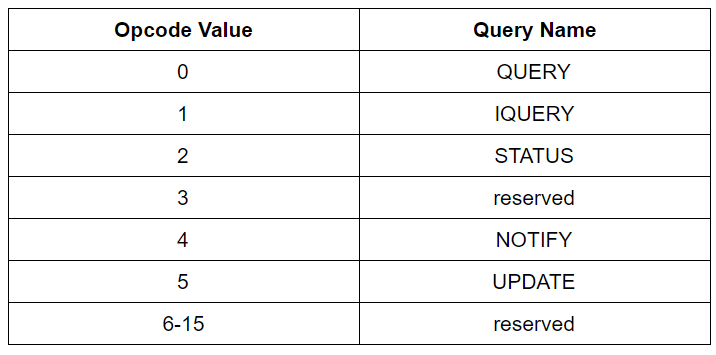
- QUERY: It is the normal query made to a server to extract the IP address from a domain.
- IQUERY: It is exactly the reverse of QUERY, also known as Reverse DNS Lookup. It is the procedure of deducing the domain name from the IP address. It is not widely used due to its implementation difficulties.
- STATUS: It is a server status request.
- NOTIFY: It is the same as a QUERY, that is used by a master server to notify slave servers that the master’s data has been changed and a query should be initiated to find the new data. The response from the slave is not useful as it indicates that it has received the notification for the change in master’s data and the master can remove that particular slave from the retry queue of NOTIFY event. (Acc to RFC 1996)
- UPDATE: It is a specification in Opcode that is used to delete, add or update RRs from a specified DNS zone. (Acc to RFC 2136)
Authoritative Answer (AA): This is a 1-bit subfield. It is set to 1 indicating that the responding name server is the authority for the domain name in the Question Section.
Truncated (TC): It is a 1-bit subfield. It is set to 1 mean that the response exceeded 512 bytes and truncated to 512. It is used when DNS servers make use of UDP services.
Recursion Desired (RD): It is a 1-bit subfield. If set to 1, it means that the client requires a recursive answer. It is set in the query message and is recursively used in response.
Recursive Available (RA): It is a 1-bit subfield. If it is set to 1, it indicates that the recursive answer or response is available and is only set in the response message.
Zero (Z): This is a 3-bit subfield that is set to zeroes. (000).
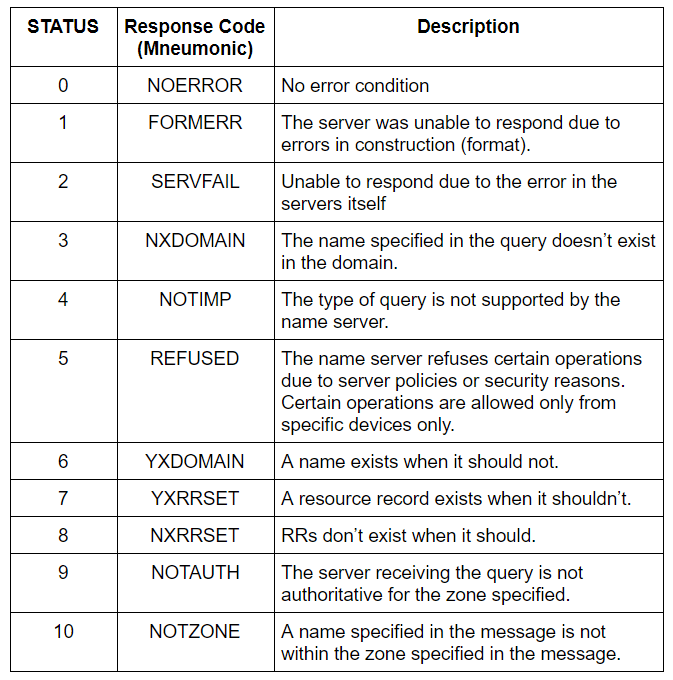
Response Code (RCODE):
It is a 4-bit field that indicates the status of the response.
Question Section:
It carries mostly questions in the query. It is present in both the query and response.
QDCOUNT: It is a 16-bit field that specifies the number of entries in the Question Section.
Question Section Format:
| QNAME |
| QTYPE |
| QCLASS |
- QNAME: It contains the name of the requested resource. The domain is represented in the form of sequential labels.
- QTYPE: Specifies the type of DNS record i.e. A, MX, TXT, etc.
- QCLASS: It is a two-octet code that specifies the class of the query. Ex. IN in this field depicts the Internet.
Answers Section:
It carries the answers for the response. It is only present in the response message. This contains the response from the server to the client.
ANCOUNT: It is a 16-bit field that indicates the number of resource records in the answer section
Authoritative Section:
It gives information about the authoritative servers for the query.
NSCOUNT: It is a 16-bit field that specifies the number of name server resource records in the authoritative section.
Additional Section:
It assists the resolver with additional information.
ARCOUNT: It is a 16-bit field specifying the number of resource records in the additional records section.
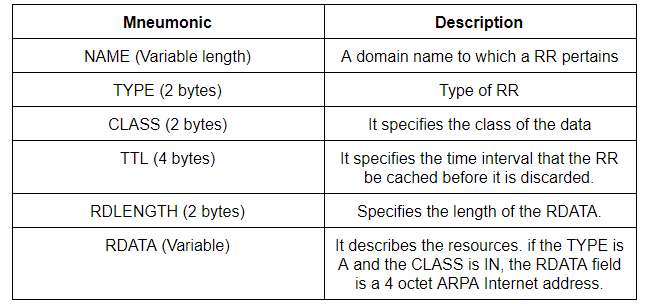
All three sections, Answer, Authoritative, and Additional, share the same format: a variable number of resource records.
Record Resource Format:
Neologism:
- Master Server: It is the authoritative server that has been configured to be the source of zone transfer. It reads the domain name data and transfers it to the Slave server.
- Slave Server: It is a server that obtains zone data from the Master server, immediately after setup of the Master server, using zone transfer.
- Zone Transfer: It is a process of copying zone files from the Master (Primary) server to the Slave (Secondary) server.
- Request For Comments (RFC): It is a document that describes the standard protocols, network technologies and TCP/IP. Since 1969, RFCs have been published on various protocols, applications, procedures, and concepts in networking.
- Zone: A DNS zone is a specific portion of the DNS namespace that is managed by a specific organization.
Ex. Let us suppose techprodezza.com is the root domain and blog.techprodezza and support.techprodezza are the subdomains. Here the blog.techprodezza requires management from other organizations but techprodezza.com and support.techprodezza are managed by same authority. Then blog.techprodezza will be in its own zone and the remaining two will be in the other zone.
 Techprodezza