I have a Confession to make…
Hello!! I didn’t see you there, hahahahaha.
Probably because I haven’t posted in like 2 months. I will not try to explain myself here. I know…. We were just about to get started with the main part of the Cloud Computing, but unfortunately I got lost in learning this myself. Probably because I am a beginner in this field.
Side Note: I used “Probably because” 2 times in that paragraph
And I genuinely felt bad about not posting. But at the same time, I didn’t want to write anything gibberish and irrelevant about what I was not able to understand. I’m not saying I know a lot about the stuff in this field now, after 2 months. I still don’t know about anything, but I might have figured out a way to keep posting from now on…
Ironic how I said I’ll not explain myself, but I still did.
P.S: Why do I feel like my confession is too believable to be true. I mean, I was never good at telling stories 😉
Understanding GCP
After a very believable confession, let’s move on
When you run your workloads in GCP, you use projects to organize them. You use Google Cloud Identity, and Access Management, also called IM, or IAM to control who can do what. And you use your choice of several interfaces to connect. Projects are the main way you organize the resources you use in GCP. Use them to group together related resources, usually because they have a common business objective. The principle of least privilege is very important in managing any kind of compute infrastructure, whether it’s in the Cloud or on-premises. This principle says that each user should have only those privileges needed to do their jobs. In a least-privilege environment, people are protected from an entire class of errors.
Let’s have an example…..
Suppose I am your co-worker and we are working on a project. Suddenly one day, I accidentally delete a running production database. Why? Because I was working as the root user on the system when I shouldn’t have been. And I’m still very, very sorry.
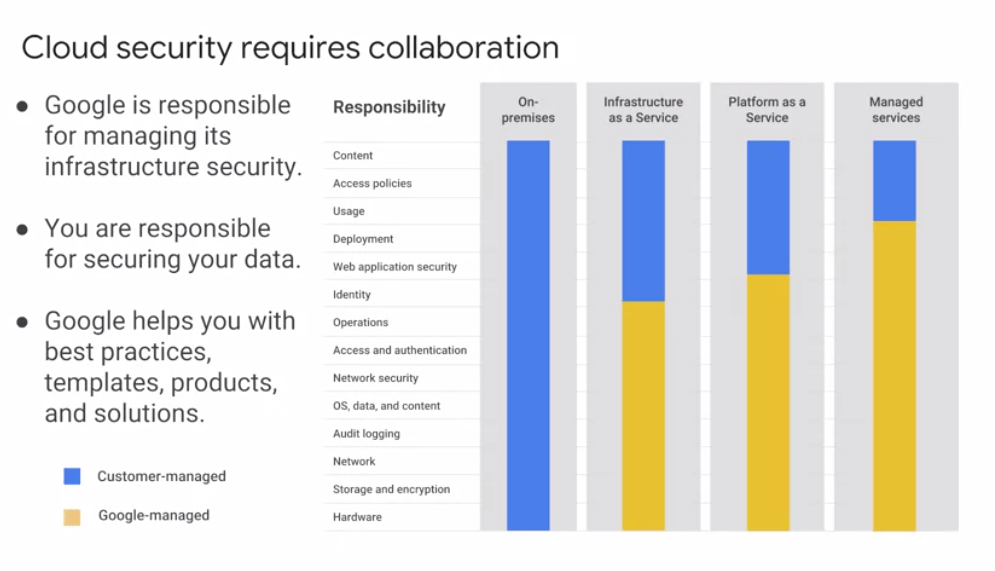
GCP customers use IM to implement least privilege, and it makes everybody happier. There are four ways to interact with GCP’s management layer: through the web-based console, through the SDK and its command-line tools, through the APIs, and through a mobile app.
When you build an application on your on-premises infrastructure, you’re responsible for the entire stack security. From the physical security of the hardware, and the premises in which they’re housed, through the encryption of the data on disk, the integrity of your network, all the way up to securing the content stored in those applications.
When you move an application to Google Cloud Platform, Google handles many of the lower layers of security. Because of its scale, Google can deliver a higher level of security at these layers than most of its customers could afford to do on their own. The upper layers of the security stack remain the customers’ responsibility. Google provides tools such as IAM to help customers implement the policies they choose at these layers.
——————————— ————————- ———————– ———————–
It is completely fine if you are not able to understand this, even after reading this twice or thrice. I didn’t either.
Stay tuned for the next blog-post where we’ll talk dig deeper about the IM’s / IAM’s , and how you can create and run the projects in GCP.
 Techprodezza