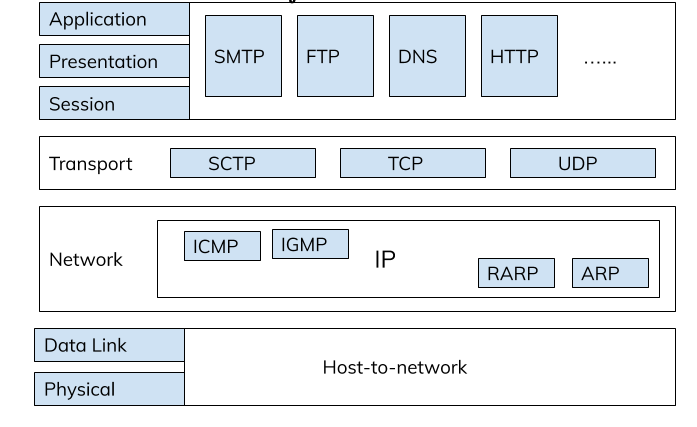
From the earlier discussions, we are aware that the communications in the network is based on different network models. And also we have learnt about OSI Model. If not exactly remembering, here is the reference. TCP/IP Network Model is yet an another important one beside OSI Model. OSI being the seven layered model, TCP/IP Model is five layered. The only difference is that session, presentation and application layers duty is performed by a single layer: Application layer. We shall dive into more details of layers now.

The TCP/IP Five-Layer Network Model
1. Physical Layer
This layer is most like what it sounds, it represents the physical devices that interconnect computers. This includes the specifications for the networking cables and the connectors that join devices together along with specifications describing how signals are sent over these connections.
The physical layer of our Network Model is the most complex. It converts the data to the binary digits, 0s and 1s, that can be understandable by the devices. But, very complicated mathematics, physics, and electrical engineering principles are at play to transmit huge volumes of data across tiny wires at incredible speeds. These ones and zeros sent across the networks at the lowest level, are what make up the frames and packets of data that we’ll get to know in the coming discussion of layers.
To summarize, no matter what video we send to our friend or mail our faculty, what we’re really doing is sending ones and zeros across the physical layer.
2. Data Link layer
This layer is also known as network interface or network access layer. At this layer, we introduce our first protocols. The data link layer is responsible for defining a common way of interpreting the signals, so network devices can communicate. Though there are list of protocols at the data link layer, the most common is known as Ethernet. Ethernet and the data link layer provide a means for software at higher levels of the stack to send and receive data.
One of the primary purposes of this layer is to essentially abstract away the need for any other layers to care about the physical layer and what hardware is in use. By dumping this responsibility on the data link layer, the Internet, transport and application layers can all operate the same no matter how the device they’re running on is connected.
For example, our web browser doesn’t need to know if it’s running on a device connected via a twisted pair or a wireless connection. It just needs the underlying layers to send and receive data for it.
3. Network Layer
The network layer is also sometimes referred as Internet layer. It’s this layer that allows different networks to communicate with each other through devices known as routers. The network layer is responsible for getting data delivered across networks. It’s the network layer that helps in the transmission of data between two end points. The most common protocol used at this layer is known as IP or Internet Protocol. These include ICMP (Internet Control Message Protocol) , ARP (Address Resolution Protocol), etc.
IP is the most significant protocol in the complete TCP/IP suite. Network software is usually divided into client and server categories, with the client initiating a request for data and the server answering the request across the network.
We might run an email program and a web browser, both client applications, on your PC at the same time, and your email and web browser might both run on the same server. Even so, emails end up in our email application and web pages end up in our web browser. That’s because of our next layer, the transport layer.
4. Transport Layer
The transport layer sorts out which client and server programs are supposed to get the data. The protocol most commonly used in the fourth layer, the transport layer, is known as TCP or Transmission Control Protocol. Other transfer protocols also use IP to get around, including a protocol known as UDP or User Datagram Protocol. The big difference between the two is that TCP provides mechanisms to ensure that data is reliably delivered while UDP does not. Mostly TCP and UDP are responsible for ensuring that data gets to the right applications running on the nodes. The transport layer is responsible for lots of important functions of reliable computer networking. These include multiplexing and demultiplexing traffic, establishing long running connections and ensuring data integrity through error checking and data verification. So now let’s check out the last but the top most layer of our model!
5. Application Layer
As the name suggests us, it is the application or the interactive layer. It is responsible for handling high-level protocols. It allows the user interaction with the application. Not all the applications are included in this layer. The applications which directly interact with the communication system are included here. For example, Chrome, Firefox, etc. The network protocols here are HTTP (Hypertext transfer protocol), TELNET (
Teletype Network), SMTP (Simple Mail Transfer Protocol), etc. More about protocols are provided in the references.
Neologism:
- Nodes: These are the physical pieces that make up a network. They usually include any device that both receives and then communicates information. A node is either a redistribution point or a communication endpoint. The definition of a node depends on the network and protocol layer referred to.
- Address Resolution Protocol (ARP): It is used to find the physical address from the IP address.
- Internet Control Message Protocol (ICMP): It is the mechanism used by the routers or the hosts to notify datagram (basic unit of data packets) issues to the sender.
- Repeater: A repeater operates at the physical layer. It doesn’t amplify (to increase) the received signal. When the received signal is becoming weak, then they copy the signal and regenerate it with the original strength, so that they can cover longer distances.
References:
- OSI Model
- Network protocols such as HTTP, TCP, IP, etc.
- Networking devices such as routers, hubs, etc.
- About Ethernet
- Cables like fiber optic, coaxial, etc.
This is all about the TCP/IP suite. For any changes or queries, you can reach us anytime. Stay updated for more! Have a safe and healthy learning.
Stay Safe and Spread Knowledge!


I found a great website,https://www.baudcom.com.cn/
LikeLike