From the earlier posts, we might be aware of what basically is HTTP. If not, do not worry! Click here for a short description of HTTP. Now we shall dive deeper into it.
HTTP is an application layer protocol that is used for transmitting web pages like HTML. This protocol is based on client-server architecture. This is the basic foundation for the data communication of the World Wide Web (WWW). The default port of HTTP is 80 and 443 is the secured port.
HTTP Request Message Format:
We know that our browser, client, sends a request to the server to get information. This is the format in which the HTTP request is sent from the client-side.

Request Line:
The request line specifies the method, URL, and the version of HTTP used.
Method:
It is used to indicate the action to be performed on the resource by the given URL. These can be GET, POST, HEAD, etc. depending on the usage. These are case sensitive and always should be in the Upper case.
URL (Uniform Resource Locator):
This field is commonly referred to as URI (Uniform Resource Identifier) since URL is only the locator but URI can be a name, address, and combination of both. URL is a subset of URI. In the HTTP request, a URI identifies the resource on which the request is to be applied.
Version:
HTTP uses a <major>.<minor> numbering scheme to represent the versions of the HTTP protocol. The syntax of the indication is HTTP/ “major”.“minor”. Ex: HTTP/1.1 or HTTP/1.0
Header Lines:
These are used by both clients and servers to send additional information on the request or response.

Header Field Name:
As the name suggests, this is the field holding the name of the header such as connection, content-type, etc.
Value:
This field holds the value for the header field. For example, Connection: close. Here the connection is the header field name and close is the value of it.
Entity body:
This is not used generally when we are requesting for a plain HTML page. When the request uses the POST method or sending information to the server, then the entity-body is used. Then the server process the sent data and accordingly a response is generated. This field is optional.
HTTP Response Message Format:
To every request from the client, the server responds with a response message. One request yields one response indicating that the server processing the request. This response may sometimes include the entity such as a file or a resource.
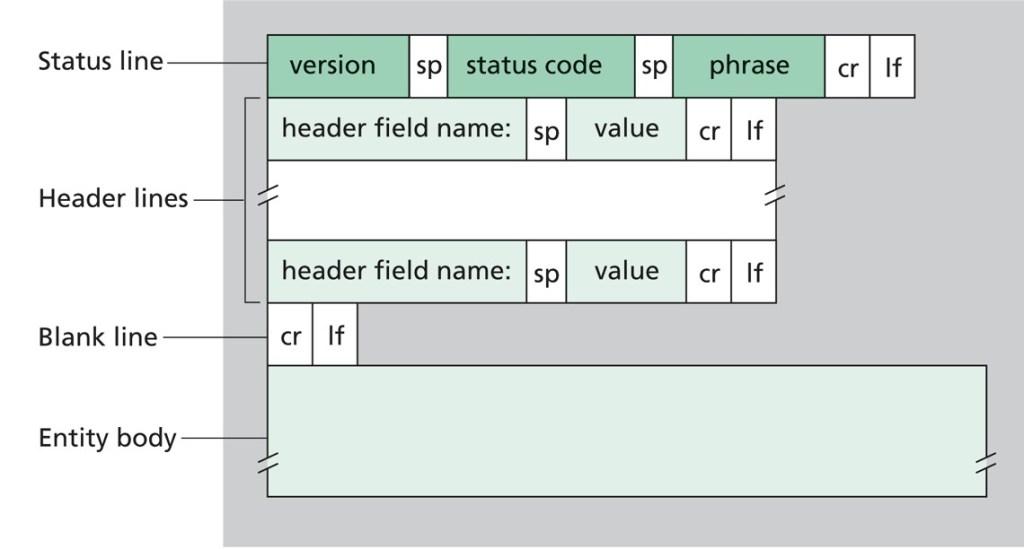
Status Line:
Version is the same as in HTTP requests.
Status code:
It is a three-digit number that indicates if the request has been successfully completed or not. The first digit signifies the class of response and the last two don’t have any categorization roles.

Phrase:
It is a text (commonly status text) that summarizes the meaning of the status code. Ex: 404 Page not found. Here 404 is the status code and “Page not found” is the phrase.
And the remaining fields are similar to the HTTP request formats.
CR-LF:
CR (Carriage Return) (ASCII 13, \r), LR ( Line Feed) (ASCII 10, \n) are used to note the termination of a line. In Windows, both CR-LF is required to terminate a line whereas in Linux only LF is used to terminate a line. In the HTTP protocol, the CR-LF sequence is always used to terminate a line.
This is the sample response when the server encountered a wrong HTTP version in the given request.
HTTP/1.1 400 Bad Request
Date: Sun, 1 Oct 2000 10:36:20 GMT
Server: Apache/2.2.14 (Win64)
Content-Length: 230
Content-Type: text/html; charset=iso-8859-1
Connection: Closed

<!DOCTYPE HTML PUBLIC "-//IETF//DTD HTML 2.0//EN">
<html>
<head>
   <title>400 Bad Request</title>
</head>
<body>
   <h1>Bad Request</h1>
   <p>Your browser sent a request that this server could not understand.</p>
   <p>The request line contained invalid characters following the protocol string.</p>
</body>
</html>
Related Headers Description:
- Date: It indicates the date of response from the server. Do not mistake it assuming that it is the date of file creation. It is the date on which that particular file is accessed by the server.
- Last-Modified: It indicates the last modified date of the file or resource.
- Content-Length: It indicates the size of information (in bits) sent or received from both the server and client.
- Content-type: It indicates the type of media sent in the entity-body. Ex: text, HTML, etc.
- Connection: It allows the sender to specify options that are intended for a response. Ex: Connection: close indicates that the connection will be terminated after the response.
References:
- Full description of Header fields
- Types of header fields
- HTTP Messages
- Layers in Networking: OSI Model, TCP/IP Model
- Network Architecture: Client-Server Model
 Techprodezza
6 thoughts on “HTTP (Hyper Text Transfer Protocol)”